The case of evil brackets

It was just another day at work, setting up Tibco EMS with Weblogic server on my 32 Windows XP machine. Umm, you know what, that is not what I do most of the time. But lets keep it that way for this blog post. I had Tibco EMS installed on my machine, and wanted to put this path C:\Program Files\Tibco\ems\tibjms.jar in my ClassPath environment variable. I went ahead, and started the Weblogic server instance and it worked like a charm. The twist came when I had to set up another instance of Weblogic on another machine. But wait, that machine was a 64 bit machine. Tadaaaa!!(an evil music). Ok that was too much.

Anyways, I had Tibco ems installed there at C:\Program Files (x86)\Tibco\ems. (Ah, hence the post title Smile). I went about with the same steps mentioned above, and got a nasty ClassNotFound error while starting up Weblogic server instance. I have limited knowledge with Java, but this was surely some kind of class resolution problem. Hmm, I sure did put the path to the tibjms.jar file correctly. I had a bad feeling with those brackets, but just to make sure, I headed to StackOverflow, (yaya, I went to Google and then StackOverflow, pff…). As expected, there were many poor souls like myself who faced similar problem. The problem was certainly with the parenthesis present in the environment variable. The solution I applied was to not edit the ClassPath variable directly. But rather,  open the startweblogic.cmd file and append the C:\Program Files (x86)\Tibco\ems\tibjms.jar path to the      %CLASSPATH% variable in the cmd file. And the started the server, Skadooosh!!! But you know what, it really gets me thinking here, the folder “Program Files (x86)” is a folder name that Windows decided I believe, ClassPath usage is in the Java world. Did Windows do this with a purpose to torture folks trying to do Java on Windows Angry smile.


Fusion Log Viewer to the rescue

OB-DF012_captpl_E_20090225180300

I know this is not the kind of image you have right now in your mind after reading the post title. Seems like the Chicken Fight in Family Guy that has got nothing to do with the on going plot Smile. But let me belabour! The other day one of my colleagues came at my desk with a possible logging issue in his application. The application was logging just fine until the day before. The application was using log4net for logging its stuff. There were no logs being generated whatsoever. Inarguably the place to look for was anything goofy in the configurations. Nope, things were all ok there. The folders used for logging had proper accessibility for his username. I asked him whether there was any recent change done like an upgrade that might have anything to do with this. Bingo, there was a recent patch release done to fix few important bugs due to which the version numbers of the assemblies were upgraded.

Equipped with that piece of information, and a boat load of anxiety I popped opened the Fusion Log Viewer (fuslogvw.exe) in Visual Studio command prompt. I enabled the logging for binding failures and started the application. Skadooosh!!!! I saw one assembly bind failure log shining right in my face. My colleague looked at it, and gave a smile that a developer gives when he “gets it”. It happened so that the assembly redirect configuration in app.config for one of the assemblies was incorrectly put and hence this wrong behaviour. I don’t know about you, but Fusion Log Viewer did save our day, and it reminded me of one of my childhood favourite characters, Captain Planet (for those who have no clue what is the flying guy all about).


What a Moqery…

Every new technology that comes into a developer’s hand goes through a so called “honeymoon period”. I’ve been hooked onto Moq these days. I am quite sure down the line, few years pass by and I shall be using something more "usable” than Moq and would consider that as my best mocking tool. But that is just another page in a developer’.

Back to the meat of this blog, the other day I was mocking certain classes for writing some behavioural tests. There was a reason to mock certain properties of a class. For Moq to mock the property it has to be marked as virtual. Ideally, I would have it part of an interface that can be mocked with Moq. But that is a different topic all together. To put forward my point, look at the below code snippet of a pretty dumb method “DeReplace”. All it does is for the string stored in BarProperty, it replaces ‘a’ with ‘@’.

private string bar;
public virtual string BarProperty { get { return bar; }set { bar = value; } }

public string DoReplace()
{
if(String.IsNullOrEmpty(bar))
{
throw new InvalidOperationException("The bar string cannot be null or empty.");
}
return bar.Replace('a', '@');
}


One heck of a useful method eh! This is a test for the above method using Moq,


[TestMethod]
public void TestBarStuff()
{
var mockBar = new Moq.Mock();
mockBar.SetupGet(x => x.BarProperty).Returns("skadoosh!!!");
var result = mockBar.Object.DoReplace();
Assert.AreEqual("sk@doosh!!!", result);
}


Did it work. Of course not. It resulted in the InvalidOperationException and the assertion failed. Why? We did setup the BarProperty correctly with Moq, but what are we using in our original method? We are using bar string. This does bring back the discussion whether to use properties for local usages or just use local member variables. I shall leave that discussion for StackOverflow, but one thing is pretty clear. If you intend to mock properties for a class, you better use them in your methods. Below is the changed class to make the test work,


private string bar;
public virtual string BarProperty { get { return bar; }private set { bar = value; } }

public string DoReplace()
{
if(String.IsNullOrEmpty(BarProperty))
{
throw new InvalidOperationException("The bar string cannot be null or empty.");
}
return BarProperty.Replace('a', '@');
}

Ahh that green color, sweet.

Happy “Moq”ing.


Some “Moq”ing

I have become a big fan of Moq since I started using it. The reason I like it so much is its ease of use. I have not bothered to learn Rhino Mocks or NMock for that matter coz since I have started using it, its the 3rd team I have joined for a project where they have choosen Moq over all others.

Right, back to work. Did you ever have a requirement where you had to mock some methods of a class and leave out certain methods as is? Consider that following utterly useless classes,

public class Foo
{
public string CallMe()
{
var result = DoSomethingImportant();
return result.ToString();
}
public virtual int DoSomethingImportant()
{
return 10000;
}
}

public class Bar : Foo
{
}

Ya they are pretty dumb I know. The point is this, say you would like to mock the Bar class and test out its CallMe method. This is how it might look,

[TestMethod]
public void TestBarStuff()
{
var mockBar = new Moq.Mock();
var result = mockBar.Object.CallMe();
Assert.AreEqual("10000", result);
}

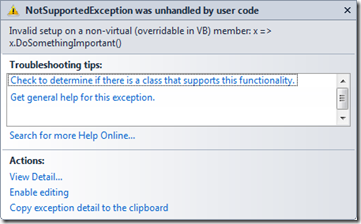
You run this test and you meet this error,
image


The problem here is, you sure have a virtual method in Foo, but there is no overridden implementation provided in Bar. Moq underneath derives from the target class (in this case Bar) and injects its setup implementations for the virtual members as provided. Although, if you intend to leave a method in the base class (Foo) as is, you need to tell Moq to do so. Common it can’t be that smart! To do this, use the “CallBase” property on the mock object. This does exactly what it says and calls the base virtual implementation in case a setup is not matched. Below is the working test for the same,

[TestMethod]
public void TestBarStuff()
{
var mockBar = new Moq.Mock();
mockBar.CallBase = true;
var result = mockBar.Object.CallMe();
Assert.AreEqual("10000", result);
}

Now run the test again. I just love when I see that green color, dont you!

Happy Moqing!


The Previous Job

I have actually stopped apologizing for not blogging more often. Anyways, my bad Sad smile

This time I just wanted to share some of the emotional experience related to our work. The reason being, its my… I think 5th switch to a new job since I got into this profession of software development. (Ya, I know I am too unstable, moving on).These companies spanned in the Americas, Asia and India. And every time I move on to my next gig, I get this feeling which I wanted to share.

So, a small flashback. I am serving notice period in a company that I am about to leave. This period is aptly called the “Honeymoon Period”. I barely give a crocodile’s ass about the quarterly results, eschew the blah blahs of the manager, I am already feeling so wonderful, everything is suddenly so perfect. The rush hour in the train feels pretty cosy. To add a cherry to the cake, I am leaving the country and looking forward to move back to my home town to work for a “better” company (snickering). Days fly, notice period is over, the good byes are done and here I am in my home town, looking at my laptop thinking about my previous job. What comes to my mind first it the place where I lived. I look at building I stayed for so long using Google StreetView. All the people I interacted with more throughout the day come one after the other flashing in my mind. Certain memorable events, good and bad, consciously come and go in my head. And then I say it aloud in mind, have I taken the right decision? Hmm, deja vu I guess. Smile

One slight point I want to make here is, no matter how much you hated your job, what matters is the relations you have built up. The culture of the new place, the nuances of human nature you experienced here, and most important the friends you made. These things will stick with you all your life. You might have had grudges with one or few of your team members, and that might be reasonable too. But the relations you make, friendships are way way above the work you did. So the last thing you should do is to blurt out all the anger on your manager’s/colleague’s face and walk out. The world is too small as I see it, especially in our profession.

So, it happened to me this time too, I am shedding away that thought for now and looking forward for a next Deja Vu experience Winking smile.